Angular Scale
In This Topic
Angular scales are commonly used in polar charts to show angles in the polar angle axis. This type of scale has some features specific to displaying angle values and their respective units. This scale has two distinct features from the standard numeric scale:
- The scale must apply a cyclic transformation for logical to scale units (for example, the projected value of 370 degrees and 10 degrees must be the same).
- When using an automatic step, the scale must choose a step that is a divisor of the angle cycle length. This improves the readability of the scale as the scale is symmetrically decorated when looking at it from right to left and left to right.
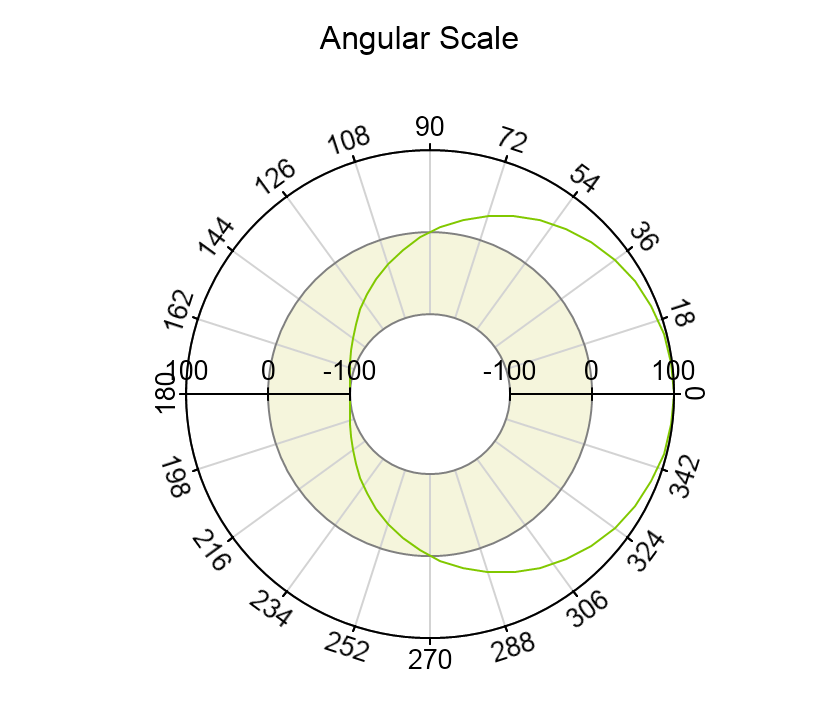
The following picture shows a an angular scale applied on the polar angle axis:
Creating an Angular Scale
You create an angular scale by creating an instance of the NAngularScale class and then adding some child nodes to its root node to denote the values on the scale. The following code shows how to achieve this:
| C# |
Copy Code
|
NAngularScale angularScale = new NAngularScale();
polarChart.Axes[ENPolarAxis.PrimaryAngle].Scale = angularScale;
|
Angle Unit
The angular scale has a property called AngleUnit that allows you to set the unit used to measure angles on the scale. You can chose from one of the three common angle measurement units - Degrees, Radians and Gradians (Grads). The default angle measurement unit for the scale is Degrees :
| C# |
Copy Code
|
angularScale.AngleUnit = NUnit.Grad;
|
Angle Unit
The angular scale includes a property called CycleLength, which determines the interval, within the full 360 degree circle, at which ticks are displayed when the major tick mode is set to AutoMinDistance. By default, the cycle length is 90, ensuring that the scale attempts to display a tick every 90° (i.e., at 90, 180, 270, and 360, or at 100, 200, 300, and 400 when the unit is grads). The following code shows how to set the CycleLength to 180 degrees:
| C# |
Copy Code
|
angularScale.CycleLength = new NAngle(180, NUnit.Degree);
|
