Drawing Explorer
In This Topic
The drawing explorer is represented by the NDrawingExplorer class. It is a hierarchical tree-view widget that provides a structural map of a drawing, allowing users to view and manage elements that aren't always easily accessible on the drawing page (are protected from selection, invisible etc.). It organizes every page, shape, group and layer into a navigable folder system, making it an essential tool for auditing complex diagrams, locating hidden objects, or renaming shapes for automation. By bypassing the visual clutter of the workspace, it offers power users a precise way to manipulate the underlying architecture of a file, from managing nested groups to toggling layer properties with a simple right-click.
The following image shows a Drawing Explorer (on the right) next to the drawing view (on the left) to which it is attached:
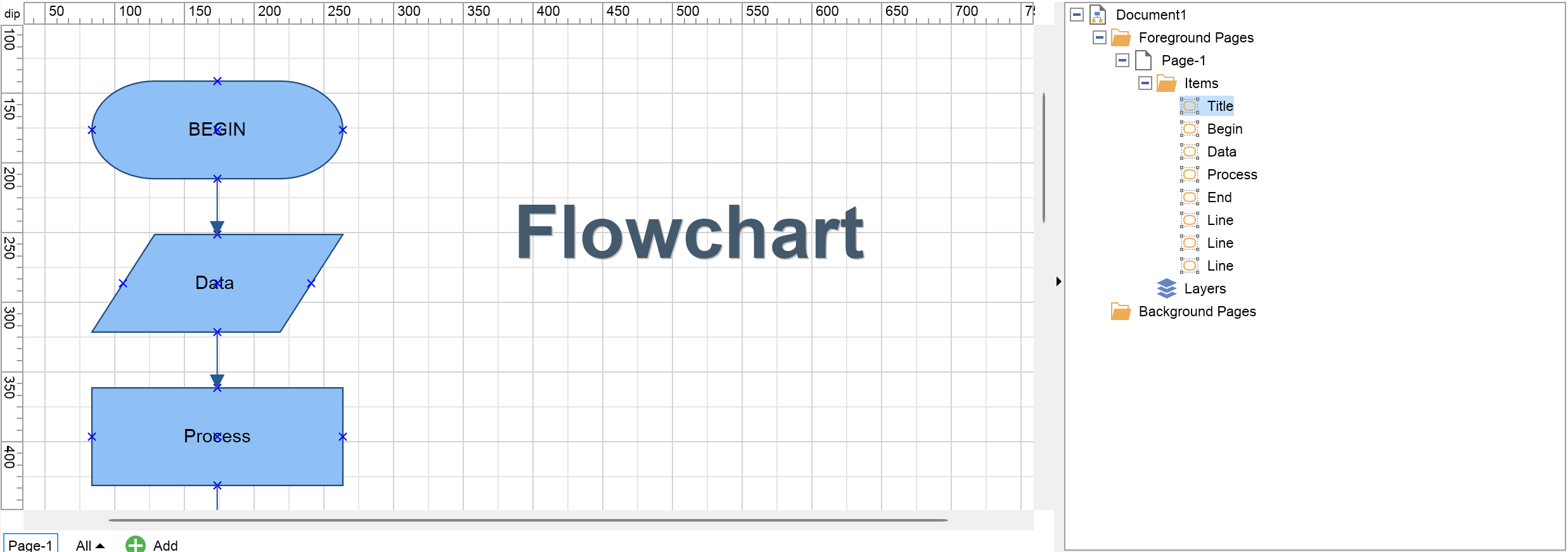
Connecting to a Drawing View
The drawing view, the document of which the NDrawingExplorer shows is specified by the DrawingView property. The following example creates a drawing view that is associated with a drawing explorer:
| Connecting to a Drawing View |
Copy Code
|
// create a drawing view
NDrawingView drawingView = new NDrawingView();
// create a drawing explorer attached to it
NDrawingExlplorer drawingExplorer = new NDrawingExlplorer();
drawingExplorer.DrawingView = drawingView;
|
Customizing the Drawing Explorer
There is an instance of the NDrawingExplorerNodePresenter class associated with each type of node displayed inside the drawing explorer. You can get the presenter associated wit ha specific type with the help of the GetTypePresenter of the NDrawingExplorer. You can also override the default presenter associated with a specific type by using the SetTypePresenter of the NDrawingExplorer.
The following table outlines the presenters that are by default associated with specific node types:
| Node Type |
Presenter Type |
| NDrawing |
NDrawingExplorerDrawingPresenter |
| NPage |
NDrawingExplorerPagePresenter |
| NPageItem |
NDrawingExplorerPageItemPresenter |
| NShape |
NDrawingExplorerShapePresenter |
| NGuideline |
NDrawingExplorerGuidelinePresenter |
| NGroup |
NDrawingExplorerGroupPresenter |
| NLayer |
NDrawingExplorerLayerPresenter |
| NPageCollection |
NDrawingExplorerPageCollectionPresenter |
| NPageItemCollection |
NDrawingExplorerNodePresenter |
| NShapeCollection |
NDrawingExplorerNodePresenter |
| NLayerCollection |
NDrawingExplorerLayerCollectionPresenter |
Typically you will want to specify a custom type presenter when you want to modify the drawing explorer context menu for a specific type of node, or perform some action when the node of this type is selected in the explorer. The following example creates a custom context menu command, that is shown in the context menu for a shape displayed in the drawing explorer:
| Customizing the Drawing Explorer |
Copy Code
|
...
NDrawingExplorer drawingExplorer = new NDrawingExplorer();
drawingExplorer.DrawingView = m_DrawingView;
// associate a custom shape presenter in order to override context menus for shapes
CustomShapePresenter customShapePresenter = new CustomShapePresenter();
drawingExplorer.SetTypePresenter(typeof(NShape), customShapePresenter);
...

public class CustomShapePresenter : NDrawingExplorerShapePresenter
{
    public CustomShapePresenter()
    {
    }
    protected override void BuildContextMenu(NDrawingExplorerNodeKey nodeKey, NMenu menu, NContextMenuBuilder builder)
    {
        base.BuildContextMenu(nodeKey, menu, builder);
        NShape shape = nodeKey.Node as NShape;
        NMenuItem menuItem = builder.AddMenuItem(menu, NResources.Image_Ribbon_16x16_smiley_png, "Custom Command");
        menuItem.Click += (args) =>
        {
            NMessageBox.Show(
                base.DrawingExplorer.DisplayWindow,
                "Custom Command clicked for shape: " + shape.Name,
                "Custom Command");
        };
    }
}
|
