
Shape styles select a specific set of fill, stroke and font styles from a drawing theme and applies them to individual shapes. The shape style of a specific shape is controlled and configured through its Style property. The shape style contains the following properties:
The values of these properties select a unique style from the style matrix of the currently selected theme components:
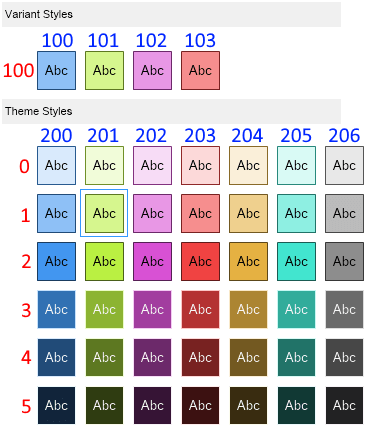
The image above demonstrates how setting a value to the color index (blue) and style index (red) properties uniquely selects a style from the style matrix of the currently selected theme.
When the style index is set to 100 and the color index ranges from 100 to 103 a variant shape style is selected.
When the style index ranges from 0 to 5 and the color index is from 200 to 206 a theme shape style is selected.
The following are two code examples:
| Set shape style to the 4-th variant style (red) |
Copy Code
|
|---|---|
shape.Style = new NShapeStyle(103, 103);
|
|
| Set shape style to the 5-th theme style on the 2-nd row (shade of orange) |
Copy Code
|
|---|---|
shape.Style = new NShapeStyle(1, 204);
|
|