Page Types
In This Topic
In NOV Diagram for .NET, there are two types of pages: foreground and background. The type is determined by the PageType property, which accepts values from the ENPageType enumeration. By default, pages are of the foreground type.
Each page can have exactly one background page, which is specified via the BackgroundPage property. The following example demonstrates how to create two pages - one foreground and one background - and assign the background page to the foreground page:
| Adding and assigning background pages |
Copy Code
|
// create a page for background
NPage backgroundPage = new NPage();
backgroundPage.Title = "Background Page";
backgroundPage.PageType = ENPageType.Background;
drawing.Pages.Add(backgroundPage);

// create a foreground page
NPage foregroundPage1 = new NPage();
foregroundPage1.Title = "Foreground Page 1";
foregroundPage1.BackgroundPage = backgroundPage;
drawing.Pages.Insert(0, foregroundPage1);
|
Background Page Mapping
The way in which the current background page (specified by the BackgroundPage property) is mapped to the bounds of the foreground page displaying it is controlled by the BackgroundPageMapping property, which accepts a value of the NTextureMapping style. This means that for the foreground page, the background page serves just as a normal vector texture, that can be stretched and tiled. Fore more information about the available texture mapping objects, take a look at the Texture Mapping topic.
The following example stretches the background page to fill the foreground page regardless of both pages size:
| Background Page Mapping |
Copy Code
|
foregroundPage.BackgroundPageMapping = new NStretchTextureMapping();
|
Differences between Foreground and Background Pages
As background pages server the logical purpose of background or watermarks for foreground pages, the most notable difference between the two types is that background pages cannot be printed or exported to PDF. Background pages are also excluded from presentations.
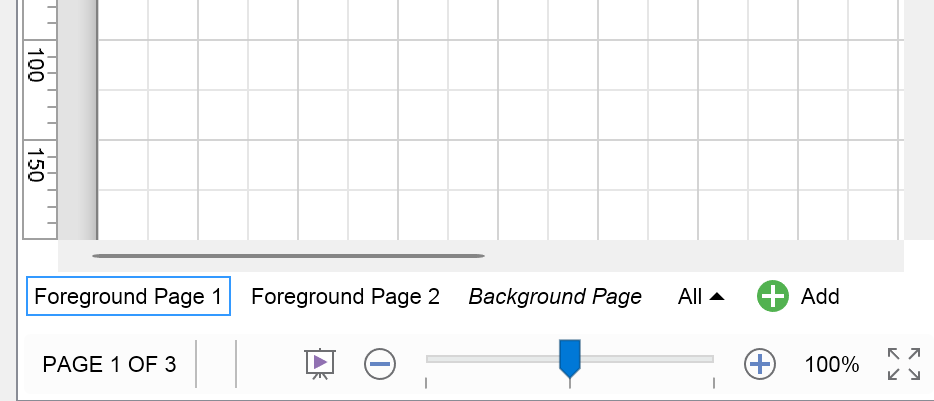
To distinguish between foreground and background pages, they are displayed in different styles depending on their type in the drawing page navigator and drawing explorer. They are also logically divided in groups of foreground pages and background pages. The following images illustrate the visual differences between pages of different type:
| Foreground and Background pages in the Page Navigator |
Foreground and Background pages in the Drawing Explorer |
 |
 |
In the Page Navigator, the background pages are always displayed after the foreground pages. The background pages are also displayed in italic style.
In the Drawing Explorer, the foreground and background pages are displayed in different folders. The icon of the background pages is also grayed out.
Foreground and Background Pages Navigation
To get the foreground pages of a drawing, you can use the GetForegroundPages method of the NPageCollection class. Similarly, to get the background pages you can use the GetBackgroundPages method. The following example gets the current sets of foreground and background pages of a drawing:
| Getting the Foreground and Background Pages of a Drawing |
Copy Code
|
NList<NPage> foregroundPages = drawing.Pages.GetForegroundPages();
NList<NPage> backgroundPages = drawing.Pages.GetBackgroundPages();
|
As mentioned, the background page is specified via the BackgroundPage property. The reverse operation - get all foreground pages, that reference a page as a background page is performed by the page GetForegroundPages method.
| Getting the Background Page and the Foreground Pages for a page |
Copy Code
|
NPage page = new NPage();
...
NPage backgroundPage = page.BackgroundPage;
NList<NPage> foregroundPages = page.GetForegroundPages();
|
